


If you are reading this, you are probably either about to redesign your website or you have already done it, and your traffic has just fallen off a cliff. I have had both versions of this conversation more times than I can count. A redesign is one of the few things in SEO where a single mistake, made in a single afternoon, can undo years of work.
I have been working in SEO for 10 years, and website redesigns and migrations are one of the areas where I have seen the most damage done to client websites, almost always unintentionally.
In this article I want to walk through exactly how to approach a redesign so that your rankings and traffic come through intact, and where the typical breakdown happens between design teams and SEO that nobody warns you about.
Quick Answer: To redesign a website without losing SEO, you need to audit and document your current site before any changes happen, map every existing URL to its new equivalent with 301 redirects, preserve your internal linking structure and metadata, and thoroughly test the new site on a staging environment before launch. The most common cause of SEO loss in a redesign is changed or removed URLs without proper redirects, so getting your redirect map right is the single most important step.
Why Do Website Redesigns Cause SEO Problems?
Before getting into the process, it is worth understanding why this happens in the first place, because once you understand the mechanism, the rest of this article makes a lot more sense.
Search engines build up trust and ranking signals for individual URLs over time. Every backlink pointing to a page, every piece of content on that page, every internal link pointing to it, all of that accumulates value attached to that specific URL.
When a redesign changes the URL structure, removes pages, restructures navigation, or rewrites content wholesale, you are effectively asking Google to start evaluating a large portion of your site from scratch.
In my experience, the websites that lose the most traffic during a redesign are not the ones where the new site is worse than the old one. Often, the new site is genuinely better. The traffic loss happens because the signals that told Google “this page is relevant and trustworthy for this query” got disconnected from the new version of that page, and nobody told Google where to find the replacement.
This is entirely preventable. It just requires SEO to be involved from the planning stage, not brought in to fix things after launch.
What Should I Do Before the Redesign Starts?
This is the stage that gets skipped most often, usually because the design and development teams want to get moving and SEO feels like it can wait. It cannot wait.
The first thing I do with any client planning a redesign is a full crawl of the existing site using Screaming Frog. This gives me a complete list of every indexed URL, its current title tag, meta description, heading structure, and internal links. I export this and keep it as a permanent record of what the site looked like before the redesign began.
Alongside the crawl, I pull a full export of organic landing pages from Google Search Console, ranked by clicks and impressions over the last 12 months. This tells me which pages are actually doing the work for the business. I also check Ahrefs for the backlink profile of the site, specifically which pages have the most referring domains pointing to them.
I had a client in the professional services sector whose previous redesign had quietly removed a blog post that was several years old and looked dated, without anyone checking it first. That single page had more backlinks than the rest of the site combined. When it disappeared, the domain’s overall authority dropped, and it took months to recover after we found and fixed the issue.
The lesson here is simple. Before you change anything, you need a complete picture of what is currently working, so that nothing valuable gets lost by accident.
How Do I Build a Redirect Map for a Website Redesign?
This is the most technical part of the process and, in my experience, the part most likely to be done badly even when an agency knows it needs doing.
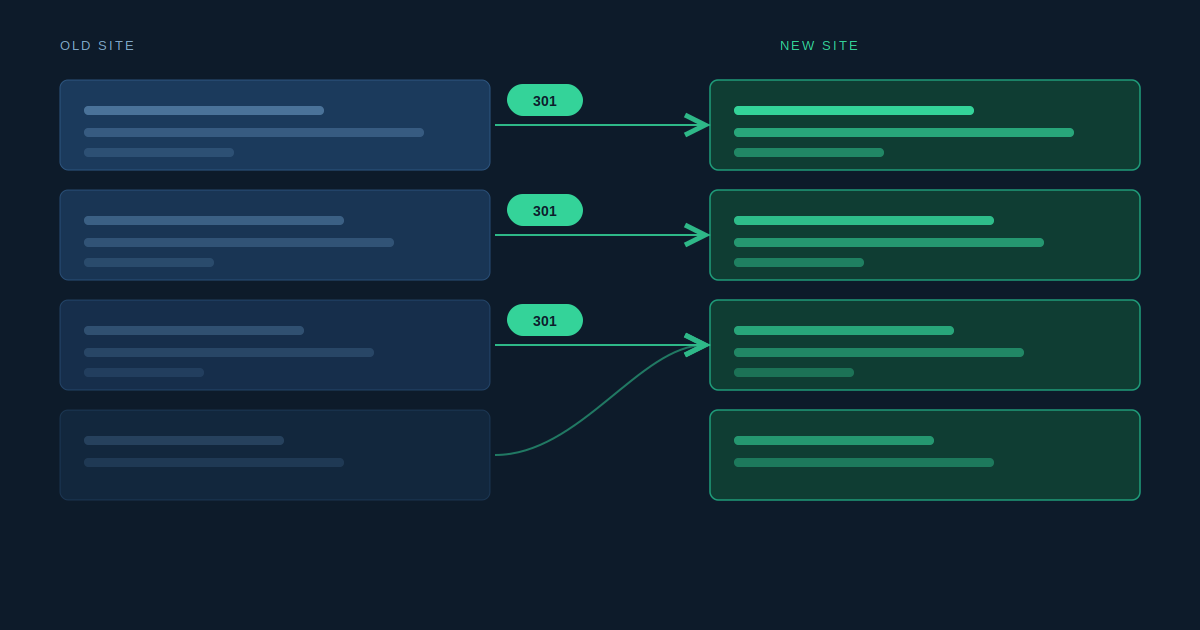
A redirect map is a spreadsheet that lists every URL on the old site in one column and the corresponding URL on the new site in the column next to it. Every single old URL needs an entry. If a page is being kept as is, the new URL might be identical to the old one. If a page is being merged into another page, it should redirect to that page. If a page genuinely no longer has an equivalent, it should redirect to the most relevant parent category, with the homepage as a last resort only.
The redirects themselves should be 301 redirects, which signal to search engines that the move is permanent and that ranking signals should transfer to the new URL. A 302 redirect signals a temporary move and does not pass that value in the same way, so it is the wrong tool for a permanent restructure.
What I see go wrong most often is redirect chains, where an old URL redirects to a second URL which itself then redirects to a third. Each hop in a redirect chain can dilute the signal being passed and slows down page load for anyone following that link. Every redirect should point directly to its final destination in one hop.
I would also flag that this is not a job to leave entirely to a developer working from a spreadsheet without SEO oversight. The decisions about which old page maps to which new page require an understanding of search intent and ranking value, not just URL similarity.
What Happens to On-Page SEO Elements During a Redesign?
A redesign often comes with a full rewrite of the site’s content, and this is where a huge amount of accumulated SEO work can quietly disappear if nobody is paying attention.
Title tags, meta descriptions, heading structure, and image alt text all carry SEO value that has often been refined over years based on what actually performs. When a content team rewrites a page for a redesign, the new copy might read better, but if the title tag no longer includes the primary keyword the page was ranking for, or the H1 has been replaced with something more “on brand” but less specific, that page’s ranking position is at risk.
My approach with clients is to treat the existing title tags, meta descriptions and heading structure as a starting point that needs sign off from SEO before it changes, not something the design and content teams rewrite freely and SEO reviews afterwards. It is far easier to get this right before launch than to try and recover a ranking position after it has dropped.
The same applies to structured data. If your current site has schema markup for reviews, products, FAQs or local business information, that markup needs to be carried over and implemented correctly on the new site. I have seen redesigns launch with all of this stripped out simply because the developer building the new site did not know it was there or what it was for.
Why Does Internal Linking Get Damaged During Redesigns the Most?
This is the issue I see most consistently, and it is rarely intentional. It happens because internal linking is largely invisible to anyone who is not specifically looking for it.
Internal links pass authority and relevance signals between pages on your site. A well-established site usually has a network of internal links built up organically over years, often including contextual links from blog content pointing to service pages, related articles linking to each other, and navigation structures that help both users and search engines understand which pages matter most.
When a site gets redesigned, especially when the design team’s priority is a cleaner visual layout, these internal links often get stripped out because they “clutter” the page. Navigation menus get simplified. Footer links get reduced. Related articles sections get removed in favour of a more minimal design.
I had a client whose new design team removed a related services section from the bottom of every blog post because it did not fit the new visual style. That section had been quietly sending a meaningful amount of internal link equity to the company’s core service pages. After it was removed, those service pages saw a gradual decline in rankings over the following months, and it took us a while to identify internal linking as the cause because nothing else on the page had obviously changed.
My recommendation is that before any redesign goes live, someone needs to map the existing internal linking structure and make sure the new design preserves the same logical connections, even if the visual presentation changes.
How Should I Test a Redesigned Website Before Launch?
Testing is where you catch the issues that would otherwise only become visible weeks after launch, by which point traffic has already dropped.
The new site should be built on a staging environment, and that staging environment needs to be blocked from being indexed by search engines. I have seen cases where a staging site was accidentally left crawlable and ended up getting indexed alongside the live site, creating duplicate content issues that took time to untangle.
Once the new site is ready on staging, I run a full Screaming Frog crawl of it and compare it against the original crawl of the old site. This comparison highlights missing pages, broken internal links, missing meta tags, and any redirect issues before launch, while there is still time to fix them without any impact on live traffic.
I also check that canonical tags are correctly set on the new site. Canonical tags tell search engines which version of a page is the “main” one when similar content exists at multiple URLs, and these can easily get misconfigured during a rebuild, particularly if the new site uses a different content management system to the old one.
Finally, I check page speed and mobile usability on the staging site using Google’s tools before launch. A redesign that looks great but loads significantly slower than the old site, or that has mobile usability issues, can affect rankings independently of any URL or content changes.
What Should I Do in the First Few Weeks After Launch?
The work does not stop at launch. The first few weeks after a redesign goes live are when problems, if there are any, tend to surface, and catching them early makes a huge difference to how quickly any issues get resolved.
Immediately after launch, I submit the new XML sitemap to Google Search Console and check that it is being processed without errors. I monitor the Coverage report in Search Console closely for any sudden increase in errors, particularly 404s, which would indicate redirects that were missed.
I also keep a close eye on the organic traffic and ranking data for the pages identified as top performers before the redesign. Some fluctuation in the days immediately after launch is normal as Google recrawls and reprocesses the site. What you are watching for is whether those fluctuations settle back to baseline within a few weeks, or whether specific pages show a sustained drop that needs investigating.
If something has gone wrong, the redirect map and pre-launch crawl data become essential here. Having a clear record of what the site looked like before means you can quickly identify what has changed for any page that has dropped, rather than trying to work it out from scratch under pressure.
Frequently Asked Questions
How long does it take for SEO to recover after a website redesign?
Should I keep my old URLs the same during a redesign?
Do I need to redirect every single old page, even low traffic ones?
Can a website redesign actually improve my SEO?
How involved should an SEO specialist be in the redesign process?
Conclusion
A website redesign does not have to mean a hit to your SEO, but it does mean SEO needs a seat at the table from day one, not a review at the end. Audit what you have, map every URL, protect your internal linking, test thoroughly before launch, and watch closely afterwards. If you are planning a redesign and want SEO involved properly from the start, take a look at our web development services or get in touch for a chat before you begin.
